Hands-On: From AI Semantic Search to AI Content Pipeline – How Static Blogs Continuously Evolve (Continued)
A few months ago, I wrote an article titled “Hands-on: Building Fully Automated AI Semantic Search with Cloudflare Vectorize and Gemini”. The problem it solved was clear: enabling semantic search for a static blog and capturing user queries that failed to find results as Content Gaps.
Once that architecture was running, I quickly realized: Search is just the last mile of the content lifecycle.
From the moment a Markdown article is written to when it’s actually discovered by readers, it must pass through summaries, translations, related recommendations, internal links, image optimization, search indexing, SEO, deployment, and quality checks. If these steps still rely on manual processing, even the smartest AI search is just a new entry point bolted onto a traditional publishing workflow.
So, the focus of this upgrade isn’t to add more AI buttons to the page, but to transform the entire blog into a repeatable content engineering pipeline:
The author is only responsible for writing and final review; the machine handles generating derivative content, building indexes, completing distribution information, and verifying the publishing results.
This article is a sequel to the previous AI search post. It mainly reviews the system’s evolution from “a single Worker + a single vector database” to a “Content Control Plane + Search Data Plane + Static Fallback Plane + Quality Gate.”
1. Architecture Change: Search Becomes Part of the Content Platform
The core pipeline in the previous article was very short:
| |
The current system now includes three important new components:
- Content Control Plane: GitHub Actions automatically processes articles and writes results back to the repository.
- Static Fallback Plane: When the Worker, Vectorize, or external models are unavailable, Pagefind and PWA can still provide basic functionality.
- Quality Gate: Lighthouse, link checking, Hugo builds, and deployment retention policies continuously verify results.
To avoid cramming the build-time and runtime pipelines into one diagram, I’ve split them into two perspectives below.
Content Generation and Write-Back
The content pipeline is triggered by a Git Push. GitHub Actions sequentially processes the article and writes the generated results back to the Git repository:
%%{init: {"flowchart": {"nodeSpacing": 10, "rankSpacing": 14, "useMaxWidth": false}, "themeVariables": {"fontSize": "16px"}}}%%
flowchart TD
    AUTHOR["Author
Markdown + Images"] --> GIT["Git Push"]
    GIT --> CONTENT["Content Processing
Summary / TL;DR / Recommendations / Cross-links"]
    CONTENT --> DELIVERY["Media & Multilingual
Alt / WebP / OG / English Translation"]
    DELIVERY -->|Commit Generated Content| REPO["Git Repository"]
%%{init: {"flowchart": {"nodeSpacing": 10, "rankSpacing": 14, "useMaxWidth": false}, "themeVariables": {"fontSize": "16px"}}}%%
flowchart TD
AUTHOR["Author
Markdown + Images"] --> GIT["Git Push"]
GIT --> CONTENT["Content Processing
Summary / TL;DR / Recommendations / Cross-links"]
CONTENT --> DELIVERY["Media & Multilingual
Alt / WebP / OG / English Translation"]
DELIVERY -->|Commit Generated Content| REPO["Git Repository"]%%{init: {"flowchart": {"nodeSpacing": 10, "rankSpacing": 14, "useMaxWidth": false}, "themeVariables": {"fontSize": "16px"}}}%%
flowchart TD
AUTHOR["Author
Markdown + Images"] --> GIT["Git Push"]
GIT --> CONTENT["Content Processing
Summary / TL;DR / Recommendations / Cross-links"]
CONTENT --> DELIVERY["Media & Multilingual
Alt / WebP / OG / English Translation"]
DELIVERY -->|Commit Generated Content| REPO["Git Repository"]%%{init: {"flowchart": {"nodeSpacing": 10, "rankSpacing": 14, "useMaxWidth": false}, "themeVariables": {"fontSize": "16px"}}}%%
flowchart TD
AUTHOR["Author
Markdown + Images"] --> GIT["Git Push"]
GIT --> CONTENT["Content Processing
Summary / TL;DR / Recommendations / Cross-links"]
CONTENT --> DELIVERY["Media & Multilingual
Alt / WebP / OG / English Translation"]
DELIVERY -->|Commit Generated Content| REPO["Git Repository"]Publishing, Search, and Quality Checks
Using the Git repository as the source of truth, the publishing pipeline connects static site building, AI semantic search, and independent quality gates:
%%{init: {"flowchart": {"nodeSpacing": 12, "rankSpacing": 14, "useMaxWidth": false}, "themeVariables": {"fontSize": "16px"}}}%%
flowchart TD
    REPO["Git Repository"] --> CI["Build, Index & Quality Gates
Hugo / Pagefind / Vector Sync
Lighthouse / Link Check"]
    CI --> PAGES["Cloudflare Pages"]
    PAGES --> STATIC["Static Access
Pagefind / Service Worker"]
    PAGES -.-> SEARCH["AI Semantic Search
Worker / Workers AI
Vectorize / D1"]
%%{init: {"flowchart": {"nodeSpacing": 12, "rankSpacing": 14, "useMaxWidth": false}, "themeVariables": {"fontSize": "16px"}}}%%
flowchart TD
REPO["Git Repository"] --> CI["Build, Index & Quality Gates
Hugo / Pagefind / Vector Sync
Lighthouse / Link Check"]
CI --> PAGES["Cloudflare Pages"]
PAGES --> STATIC["Static Access
Pagefind / Service Worker"]
PAGES -.-> SEARCH["AI Semantic Search
Worker / Workers AI
Vectorize / D1"]%%{init: {"flowchart": {"nodeSpacing": 12, "rankSpacing": 14, "useMaxWidth": false}, "themeVariables": {"fontSize": "16px"}}}%%
flowchart TD
REPO["Git Repository"] --> CI["Build, Index & Quality Gates
Hugo / Pagefind / Vector Sync
Lighthouse / Link Check"]
CI --> PAGES["Cloudflare Pages"]
PAGES --> STATIC["Static Access
Pagefind / Service Worker"]
PAGES -.-> SEARCH["AI Semantic Search
Worker / Workers AI
Vectorize / D1"]%%{init: {"flowchart": {"nodeSpacing": 12, "rankSpacing": 14, "useMaxWidth": false}, "themeVariables": {"fontSize": "16px"}}}%%
flowchart TD
REPO["Git Repository"] --> CI["Build, Index & Quality Gates
Hugo / Pagefind / Vector Sync
Lighthouse / Link Check"]
CI --> PAGES["Cloudflare Pages"]
PAGES --> STATIC["Static Access
Pagefind / Service Worker"]
PAGES -.-> SEARCH["AI Semantic Search
Worker / Workers AI
Vectorize / D1"]In practice, a single article commit triggers multiple independent GitHub Actions workflows:
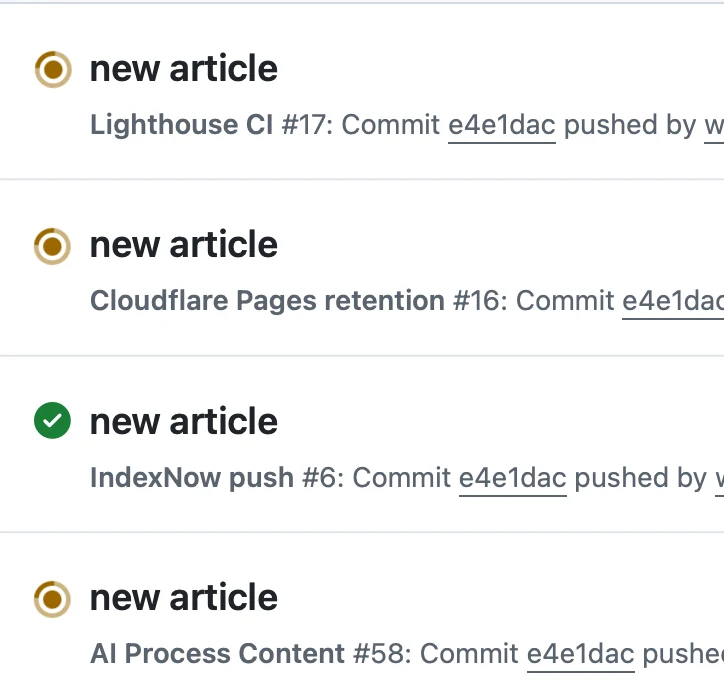
These workflows handle content processing, quality checks, search engine notifications, and deployment governance separately. By splitting responsibilities, the failure of one pipeline doesn’t obscure the execution status of others, making independent retries and debugging easier.
The key change here is separating different responsibilities:
- The Worker handles runtime search, not article generation.
- GitHub Actions handles build-time content processing, not user requests.
- Pagefind and the Service Worker provide fallback capabilities independent of AI APIs.
- The Git repository continues to store all reviewable content states.
This way, even if a specific AI service is temporarily unavailable, the blog remains a fully functional static site for reading and searching.
2. Search Layer Evolution: From Single Gemini Path to Swappable Embeddings
The previous article used Gemini’s text-embedding-004 to generate 768-dimensional vectors. The current implementation switches the default embedding path to Cloudflare Workers AI:
| |
The Gemini path hasn’t been removed; it’s retained as a swappable alternative implementation. This isn’t about “the more models, the better,” but about decoupling model selection from business logic.
The constraint that must be strictly enforced is:
The document vectors written to Vectorize and the query vectors generated at search time must use the same model, dimensions, pooling, and normalization method.
If any of these parameters are inconsistent, even if the API calls all succeed, the retrieval quality will silently degrade. This type of problem is more dangerous than a direct error because the system appears to be searching, but the results become increasingly irrelevant.
Deleting Articles Must Also Delete Their Vectors
The early synchronization script only performed Upserts. When an article was deleted or renamed, the old vector could remain in Vectorize, leading to “ghost articles” that appear in search results but return a 404 when opened.
The current workflow first identifies deleted or renamed article slugs via Git diff, then calls Vectorize delete_by_ids:
| |
While this step seems like simple cleanup, it actually solves the consistency problem between the search index and the content source of truth:
- The Markdown repository remains the Source of Truth.
- Vectorize is just a rebuildable index layer.
- The index must not retain facts that no longer exist in the repository.
Threshold Adjustability: From Backend to Frontend
The Worker currently uses 0.55 to determine if a search query is a true hit and writes the result to D1:
| |
The frontend provides a slider with a default value of 0.6, allowing readers to adjust the display threshold themselves.
These two thresholds have different purposes:
- The Worker threshold determines if the query is logged as a Content Gap.
- The Frontend threshold determines which candidate results are shown to the current reader.
This separation is more flexible than using a single fixed score for both analysis and display. However, it also means the thresholds need continuous calibration based on real queries, rather than treating 0.55 as a universal constant for all models.
3. The Ten-Step Pipeline: How One Push Processes an Article
When content/** or static/image/** changes, GitHub Actions executes a ten-step pipeline:
| Step | Processing Content | Primary Output |
|---|---|---|
| 1 | Sync Embeddings | Vectorize Index |
| 2 | Generate Chinese Summary | ai_summary |
| 3 | Generate Three TL;DR Points | ai_tldr |
| 4 | Identify Article Series | series_part and other fields |
| 5 | Calculate Semantic Related Recommendations | ai_related |
| 6 | Select Primary Image from Body | images / OG Image |
| 7 | Inject Internal Cross-links | Markdown Links |
| 8 | Generate Image Alt Text | Accessibility & Image SEO Text |
| 9 | Convert to WebP | Compressed Image Copies |
| 10 | Translate Chinese to English | index.en.md |
%%{init: {"flowchart": {"nodeSpacing": 8, "rankSpacing": 14, "useMaxWidth": false}, "themeVariables": {"fontSize": "16px"}}}%%
flowchart TD
    PUSH["Commit & Index
Article Push · 1. Sync Vectors"]
    PUSH --> CONTENT["Content Structuring
2. Summary · 3. TL;DR
4. Series · 5. Related"]
    CONTENT --> ENRICH["Content Enhancement & Translation
6. OG Image · 7. Cross-links
8. Alt Text · 9. WebP · 10. CN→EN"]
    ENRICH --> COMMIT["Commit Generated Content"]
%%{init: {"flowchart": {"nodeSpacing": 8, "rankSpacing": 14, "useMaxWidth": false}, "themeVariables": {"fontSize": "16px"}}}%%
flowchart TD
PUSH["Commit & Index
Article Push · 1. Sync Vectors"]
PUSH --> CONTENT["Content Structuring
2. Summary · 3. TL;DR
4. Series · 5. Related"]
CONTENT --> ENRICH["Content Enhancement & Translation
6. OG Image · 7. Cross-links
8. Alt Text · 9. WebP · 10. CN→EN"]
ENRICH --> COMMIT["Commit Generated Content"]%%{init: {"flowchart": {"nodeSpacing": 8, "rankSpacing": 14, "useMaxWidth": false}, "themeVariables": {"fontSize": "16px"}}}%%
flowchart TD
PUSH["Commit & Index
Article Push · 1. Sync Vectors"]
PUSH --> CONTENT["Content Structuring
2. Summary · 3. TL;DR
4. Series · 5. Related"]
CONTENT --> ENRICH["Content Enhancement & Translation
6. OG Image · 7. Cross-links
8. Alt Text · 9. WebP · 10. CN→EN"]
ENRICH --> COMMIT["Commit Generated Content"]%%{init: {"flowchart": {"nodeSpacing": 8, "rankSpacing": 14, "useMaxWidth": false}, "themeVariables": {"fontSize": "16px"}}}%%
flowchart TD
PUSH["Commit & Index
Article Push · 1. Sync Vectors"]
PUSH --> CONTENT["Content Structuring
2. Summary · 3. TL;DR
4. Series · 5. Related"]
CONTENT --> ENRICH["Content Enhancement & Translation
6. OG Image · 7. Cross-links
8. Alt Text · 9. WebP · 10. CN→EN"]
ENRICH --> COMMIT["Commit Generated Content"]Why Write Generated Results Back to Git?
An alternative approach is to generate all content temporarily during the build without writing it back to the repository. It’s “cleaner,” but has a significant problem: summaries, translations, and internal links only exist in the build artifacts, and authors can’t review them like normal code.
The current approach writes results back to Markdown:
- Generated content enters the Git diff.
- Incorrect translations and bad links can be manually corrected.
- Every modification has a commit history.
- Hugo builds don’t depend on runtime LLM calls.
The direct cost is that the CI gains the ability to modify the content repository, so it must control repeated runs and concurrent writes.
Idempotency is More Important Than Automation
The scripts for summaries, TL;DR, and translations all record the body text hash. If the body hasn’t changed, they skip execution, avoiding a model call on every Push.
The related recommendations script rounds scores to two decimal places and skips writing if the new data matches the old, preventing minor fluctuations in vector retrieval from creating meaningless diffs.
Commits generated by the AI Workflow itself contain [skip ai-sync] to prevent re-triggering. If the user pushes a new commit while the workflow is running, the script attempts a rebase before pushing, with a maximum of three retries.
This mechanism doesn’t solve a performance problem; it addresses the two most common failures in auto-write-back systems:
- Recursive workflow triggering, creating an infinite loop of commits.
- Multiple concurrent runs overwriting each other’s content.
4. AI is Not Just for Generation, But for Organization
Adding summaries and translations is easy to understand. But the more important part of this refactoring is giving existing articles a structure.
TL;DR and Series Navigation
ai_tldr renders three core conclusions at the top of an article, allowing readers to quickly decide if it’s worth reading before diving into a long post.
Series identification doesn’t rely on LLMs. It uses deterministic rules based on patterns like “Part” in the title:
| |
I deliberately use deterministic rules here instead of letting the model decide everything. Problems solvable with stable rules shouldn’t introduce the uncertainty of a model.
Related Recommendations: From Tag Matching to Semantic Matching
Traditional blog “related articles” often rely on tags. The problem is that tags are easily missed, and two articles on similar topics might not share the exact same tags.
The current ai-related-rebuild.py script queries the existing Worker with the article’s title, excludes the article itself, and writes the Top-K results to ai_related.
This effectively reuses the same vector index:
| |
The same retrieval capability serves both users and content organization.
Automatic Cross-linking is Not Random Link Spamming
Cross-linking happens in two stages:
- An LLM extracts 1 to 3 distinctive anchors for each article.
- A deterministic script finds the first mention of these anchors in other articles and injects internal links.
The script skips code blocks, existing links, headers, and HTML. Each article gets a maximum of 5 new links.
This limit is crucial. The goal of internal links is to help readers find supplementary context, not to turn the article body into an SEO link farm.
5. The Bilingual System: Translation is Just the First Step
After generating index.en.md, the English version still needs to solve problems related to discovery, navigation, and search result mapping.
The current implementation adds four layers of handling:
- Hugo generates separate URLs for Chinese and English.
- Pages output
hreflangandx-defaulttags. - The homepage performs an automatic redirect based on the browser’s language, respecting the user’s manual choice.
- The footer provides explicit language switching links.
The search layer has an additional problem: the Metadata returned by the Worker isn’t necessarily in the current page’s language.
Therefore, the English page generates a slug → English title / URL mapping table during the build. After receiving the Worker results, it replaces the display title and link using the stable slug:
| |
This is a practical compatibility layer, but not the final form. A more complete design would explicitly store a language field in the vector index, or even use separate namespaces for different languages, to prevent multilingual documents with the same slug from overwriting each other.
6. When AI Services Are Unavailable, the Blog Must Still Be Searchable
One of the most important capabilities added to the system isn’t actually AI, but Pagefind.
AI search depends on the Worker, the Embedding model, and Vectorize. An anomaly in any layer can render the search entry point useless. Pagefind, on the other hand, scans the static HTML after a Hugo build and generates a pure frontend full-text index:
| |
The two search methods handle different tasks:
| Capability | AI Semantic Search | Pagefind Full-Text Search |
|---|---|---|
| Strength | Semantic similarity, conceptual relationships | Exact words, title and body matching |
| Runtime Dependency | Worker + Embedding + Vectorize | Static index in the browser |
| Network Failure Impact | May be unavailable | Works after index is loaded |
| Cost | API and edge compute calls | Build-time cost |
The page doesn’t disguise the two as the same search. It clearly tells the reader: AI search is the primary option, full-text search is an independent fallback.
flowchart TD
    USER["User query"] --> AISEARCH["AI semantic search"]
    AISEARCH -->|Available| RESULTS["Semantic results"]
    AISEARCH -->|Unavailable or no useful match| PAGEFIND["Pagefind full-text search"]
    PAGEFIND --> STATIC["Static index results"]

    USER --> ARTICLE["Previously visited article"]
    ARTICLE --> SW["Service Worker cache"]
    SW -->|Offline| CACHED["Cached HTML and assets"]
flowchart TD
USER["User query"] --> AISEARCH["AI semantic search"]
AISEARCH -->|Available| RESULTS["Semantic results"]
AISEARCH -->|Unavailable or no useful match| PAGEFIND["Pagefind full-text search"]
PAGEFIND --> STATIC["Static index results"]
USER --> ARTICLE["Previously visited article"]
ARTICLE --> SW["Service Worker cache"]
SW -->|Offline| CACHED["Cached HTML and assets"]flowchart TD
USER["User query"] --> AISEARCH["AI semantic search"]
AISEARCH -->|Available| RESULTS["Semantic results"]
AISEARCH -->|Unavailable or no useful match| PAGEFIND["Pagefind full-text search"]
PAGEFIND --> STATIC["Static index results"]
USER --> ARTICLE["Previously visited article"]
ARTICLE --> SW["Service Worker cache"]
SW -->|Offline| CACHED["Cached HTML and assets"]flowchart TD
USER["User query"] --> AISEARCH["AI semantic search"]
AISEARCH -->|Available| RESULTS["Semantic results"]
AISEARCH -->|Unavailable or no useful match| PAGEFIND["Pagefind full-text search"]
PAGEFIND --> STATIC["Static index results"]
USER --> ARTICLE["Previously visited article"]
ARTICLE --> SW["Service Worker cache"]
SW -->|Offline| CACHED["Cached HTML and assets"]The PWA Service Worker adds another layer of offline capability:
- HTML uses stale-while-revalidate.
- CSS, JavaScript, and images use cache-first.
- Dynamic requests like the Worker API and Cloudflare Analytics are not cached.
The design principle here is: Cache content, don’t cache dynamic decisions.
7. From “Ship It” to “Sustain It”
As features grew, another risk emerged: a page building successfully doesn’t mean the experience hasn’t regressed.
To address this, the project added several types of quality checks.
Lighthouse CI
Every push that affects rendering checks the Chinese homepage, English homepage, AI search page, and representative articles.
Current thresholds are:
- Performance ≥ 0.85
- Accessibility ≥ 0.90
- Best Practices ≥ 0.85
- SEO ≥ 0.90
These thresholds currently use warnings rather than hard blocks. The reason is that Lighthouse itself has environmental fluctuations, making it more suitable as a trend monitor and regression indicator at this stage.
Detailed reports are retained as GitHub Actions Artifacts for 7 days, and temporary online reports are also uploaded.
Link Checking & Search Engine Notification
Lychee scans links in Markdown and major Layouts weekly. When it finds broken links, it automatically creates an Issue rather than waiting for reader feedback.
After regular content pushes, the IndexNow Workflow extracts the changed Chinese and English URLs and proactively notifies search engines that support IndexNow. AI pipeline commits with [skip ai-sync] are skipped to avoid duplicate triggers.
These two pipelines address:
- Whether old content is still accessible.
- Whether new content can be discovered as quickly as possible.
Images & Metadata
The pipeline also fills in a set of details that are easy to overlook but have a long-term impact on user experience:
- Generates Open Graph images from the first image in the article body.
- Uses the site-wide default cover when no body image exists.
- Supplements weak Alt Text using a vision model.
- Converts PNG/JPG to WebP, keeping the original as a fallback for compatibility.
- Outputs JSON-LD Publisher information.
- Monitors traffic via Cloudflare Web Analytics.
Individually, these capabilities are not complex, but together they determine how an article actually performs on social shares, search results, screen readers, and mobile networks.
8. Lessons Learned & Trade-offs
1. Don’t Mistake the Current Floating Button for a Full AI Q&A
The floating entry on article pages passes the current article slug as a ctx parameter to the Worker. However, the Worker currently does not consume this parameter, nor does it call a generation model to compose a final answer.
Its current, more accurate positioning is:
A site-wide semantic search UI with article entry context, not a complete RAG Agent that directly answers questions based on the current article’s content.
If upgrading to a true article Q&A in the future, it would require adding chunk-level indexing, context assembly, source citations, and answer generation capabilities.
2. Auto-Generated Doesn’t Mean Auto-Correct
Translations, summaries, anchors, and Alt Text can all be wrong. The purpose of writing results back to Git is to ensure auto-generated content undergoes code-review-style checks.
In a technical blog, the model’s most common mistake isn’t grammatical errors, but translating “might,” “planned,” or “current implementation” as if they were completed facts.
3. The Longer the Build Pipeline, the More Critical the Permission Boundaries
The AI Workflow can modify the repository; the Worker can access Vectorize, D1, and Workers AI. These are not ordinary front-end plugins; they are system entities with write or resource invocation permissions.
For production, at a minimum, you need to continue tightening:
- The permission scopes of GitHub Tokens and Cloudflare Tokens.
- The Worker’s CORS Allowed Origin.
- Rate limiting and abuse protection for the search API.
- A manual review entry point for when auto-commits cause conflicts.
4. “Static-First” Can’t Just Be a Slogan
If the homepage rendering depends on a Worker, article loading depends on a database, and search depends on a generation model, then it’s effectively no longer a reliable static blog.
The boundaries the current system maintains are:
- Article reading never depends on AI services.
- Pagefind is the fallback when AI search fails.
- Previously visited pages can be read offline.
- All AI-generated results are written as plain Markdown or static resources before deployment.
AI is an enhancement layer, not a prerequisite for the site’s survival.
9. Next Steps
This system has evolved from a single AI search feature into a content engineering pipeline, but several clear next steps remain:
- Add a language field or namespace to the vector index to fully resolve multi-language document coverage.
- Make the Worker actually consume the article
ctxto enable chunk-level citations and answer generation with sources. - Add rate limiting, origin validation, and more complete observability to the search API.
- Incorporate Mermaid, translation, and internal link checks into the automated acceptance criteria, not just relying on a successful Hugo build.
- Use a diff summary of AI-generated content as a clear manual review gate.
Summary
The previous article addressed “how to give a static blog AI-powered semantic search.” This evolution addresses a different problem:
As the number of articles, languages, and automation capabilities continue to grow, how do you create a stable closed loop for content—from writing to publishing, discovery, retrieval, and maintenance?
What emerged is not a blog with “lots of AI features,” but an engineering system with relatively clear responsibilities:
- Git is the source of truth for content.
- GitHub Actions is the content control plane.
- Cloudflare Worker, Workers AI, Vectorize, and D1 form the search data plane.
- Pagefind and PWA form the static fallback plane.
- Lighthouse, Lychee, and Hugo Build form the quality gate.
The real value isn’t having AI write all the content for the author. It’s having machines handle the repetitive, verifiable, and rollback-able processing work, freeing the author to focus on topic selection, judgment, and final review.
🤖 AI Related Posts by semantic similarity
Want updates? Subscribe via RSS
Related Content
- Hands-On: Building an Automated AI Semantic Search With Cloudflare Vectorize and Gemini
- Practical · Building a Memory-Enabled AI Writing Partner (Part 3): Security Architecture (RAG Protection, Fact Guard, and BYOK)
- Practical Guide: Building a Memory-Enabled AI Writing Partner (ikun) – Retrieval System (Vector Search, Hybrid Search & Cloud Deployment)
- Practical Guide · Building a Memory-Powered AI Writing Partner (Part 1): Multi-Agent Architecture Evolution
- Two Real Problems in AI Programming: Multi-Project Task Management and Multi-User Collaboration Isolation